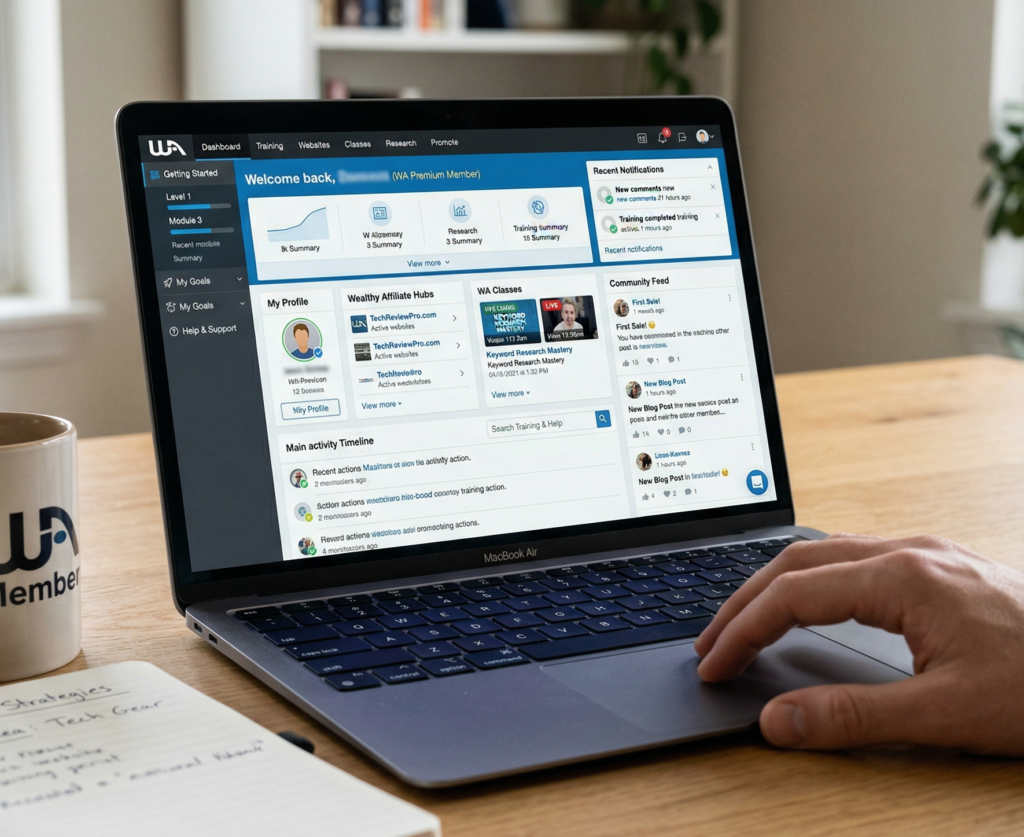
The Wealthy Affiliate dashboard is where everything comes together for your online business. Whether you’re brand new to affiliate marketing or already have some experience, setting it up the right way can make a big difference. When your dashboard is organized, it’s easier to find what you need and stay focused every time you log in.
At first, it can feel overwhelming. There are menus, notifications, tools—everything competing for your attention. But once you get familiar with it, the dashboard becomes a powerful workspace. It helps you manage your training, track progress, connect with others, and monitor your websites. A little organization goes a long way in keeping things running smoothly.
This guide walks you through simple ways to set up your dashboard so it works for you. It also answers common questions and shares a few practical tips to help you stay productive, whether you’re just starting out or already up and running.
What Is the Affiliate Dashboard?
Think of the dashboard as your main hub. From here, you can jump into training, check your website stats, connect with the community, and manage your affiliate activity.
Here are the main features:
- Training Center: Keeps track of your progress and gives you access to all courses and bootcamps.
- Website Management: Lets you build, monitor, and manage your sites in one place.
- Live Chat & Community: A space to ask questions, share ideas, and get help quickly.
- Affiliate Program Center: Shows your commissions, stats, and tools for promoting offers.
- Site Content: Where you write, edit, and publish your blog posts.
- Notifications & Messages: Keeps you updated on training, comments, and support.
Once you get comfortable navigating these areas, you’ll be able to find what you need without wasting time.
First Steps: Customizing Your Dashboard
A little setup upfront can save you a lot of time later. The goal is to make your dashboard match how you like to work.
Here are a few simple ways to get started:
- Pin your go-to resources: If you use certain tools or training often, add them to your favorites so they’re always easy to reach.
- Adjust notifications: Too many alerts can be distracting. Keep the ones that matter and turn off the rest.
- Organize the sidebar: Move your most-used sections closer to the top for quicker access.
- Pick a display mode: Choose light or dark mode—whichever feels easier on your eyes.
These small changes make the dashboard feel less cluttered and more intuitive.
Tracking Your Progress
When you’re juggling training and building a website, it’s easy to lose track of where you left off. The dashboard helps you stay on course.
Here’s what to keep an eye on:
- Learning progress: Use checklists and progress bars to pick up right where you stopped.
- Project tracking: Add widgets for tasks or goals so you can see what needs attention.
- Site health: Each website has a score that shows how it’s performing, including content and activity.
- Recent activity: A quick way to review what you’ve done—and what still needs work.
Checking these at the start of each session helps you stay focused. It also helps to set aside time each week to review your progress and adjust your plan if needed.
Using the Community and Support Tools
The community is one of the most valuable parts of the platform. When you’re stuck or need feedback, it’s right there.
You can use the dashboard to:
- Jump into live chat for quick help
- Send direct messages to experienced members or mentors
- Access help guides and training resources
- Track comments and feedback on your content
Staying connected keeps you motivated and helps you solve problems faster.
Affiliate Tools and Insights
If you’re focused on earning through affiliate marketing, the dashboard gives you the data you need to improve.
Here’s what you’ll find:
- Commission tracking: See your earnings and review performance over time
- Referral stats: Monitor how many people you’ve brought in and what they’re doing
- Marketing resources: Access banners, links, and templates
- Goals and challenges: Stay motivated with built-in targets and progress tracking
Even if you’re just getting started, it’s worth checking these regularly. They can show you what’s working—and what needs more attention.
Keeping Your Dashboard Clean and Useful
Once everything is set up, a little maintenance keeps it that way.
Quick weekly cleanup:
- Clear out old notifications
- Check for overdue tasks
- Update your pinned resources if your focus has changed
To stay productive:
- Start each session by scanning your dashboard
- Set limits on time spent in chats or discussions if they pull you off track
A clean dashboard makes it easier to stay organized and avoid feeling overwhelmed.
Common Questions
What if the dashboard feels overwhelming?
Focus on the basics first—your sidebar and main tools. Ignore the rest for now. As you get more comfortable, you can explore and adjust things gradually.
Can I use it on mobile?
Yes. The platform works on phones and tablets, so you can check your sites, stats, and messages wherever you are.
How often should I update my setup?
About once a month is a good rule. If your goals change or you start something new, take a few minutes to adjust your layout.
Getting the Most Out of Your Dashboard
With the right setup, your dashboard becomes a central tool for running your entire affiliate business. It brings everything—training, websites, community, and earnings—into one place so you can focus on what matters most.
Simple action steps:
- Pin the tools and training you use most
- Keep notifications focused and relevant
- Check your dashboard at the start of each session
- Spend a few minutes each week keeping things organized
Small adjustments over time make a big difference. When your Wealthy Affiliate dashboard works with you instead of against you, everything feels easier to manage.