
Have you ever felt stuck trying to find low competition keywords for your website or blog? If so, you’re not alone. Keyword research sounds technical at first, but with the right tool, it can get a whole lot easier. I’ve spent years using different keyword tools, and one of the most beginner-friendly options I’ve found is the Wealthy Affiliate Keyword Tool. Breaking things down step by step makes the process clearer, less stressful, and honestly a lot more fun. I will help you get the hang of keyword research using the Wealthy Affiliate tool, whether you’re building your first website or trying to boost your SEO results.
What Makes Keyword Research So Useful?
Keyword research lays the groundwork for almost everything online. From showing up in Google, to figuring out what content to write next, it all starts here. When you can spot phrases people are searching for, you can build articles, reviews, or guides that actually get read. Search volume and competitiveness are two stats you will commonly run into. Search volume tells you how many people look up a term each month. Competition (often shown as QSR, or “Quoted Search Results,” in Wealthy Affiliate, gives an idea of how hard it’ll be to rank in Google for that keyword.
The Wealthy Affiliate Keyword Tool gives you a snapshot of all these stats that are easy to grasp. It doesn’t crowd the dashboard with stuff you don’t need, and the numbers are easy to understand. Getting familiar with these concepts will make other SEO tools easier to use too. If you’re just starting out with SEO, learning how to track down these statistics and get a sense of what they mean is a useful skill to develop.
Basics: Getting Started With the Wealthy Affiliate Keyword Tool
It only takes a minute to get into Wealthy Affiliate’s keyword platform. If you’ve already signed up, the tool is easy to access from the dashboard. There are no extra sign ups or confusing menus.
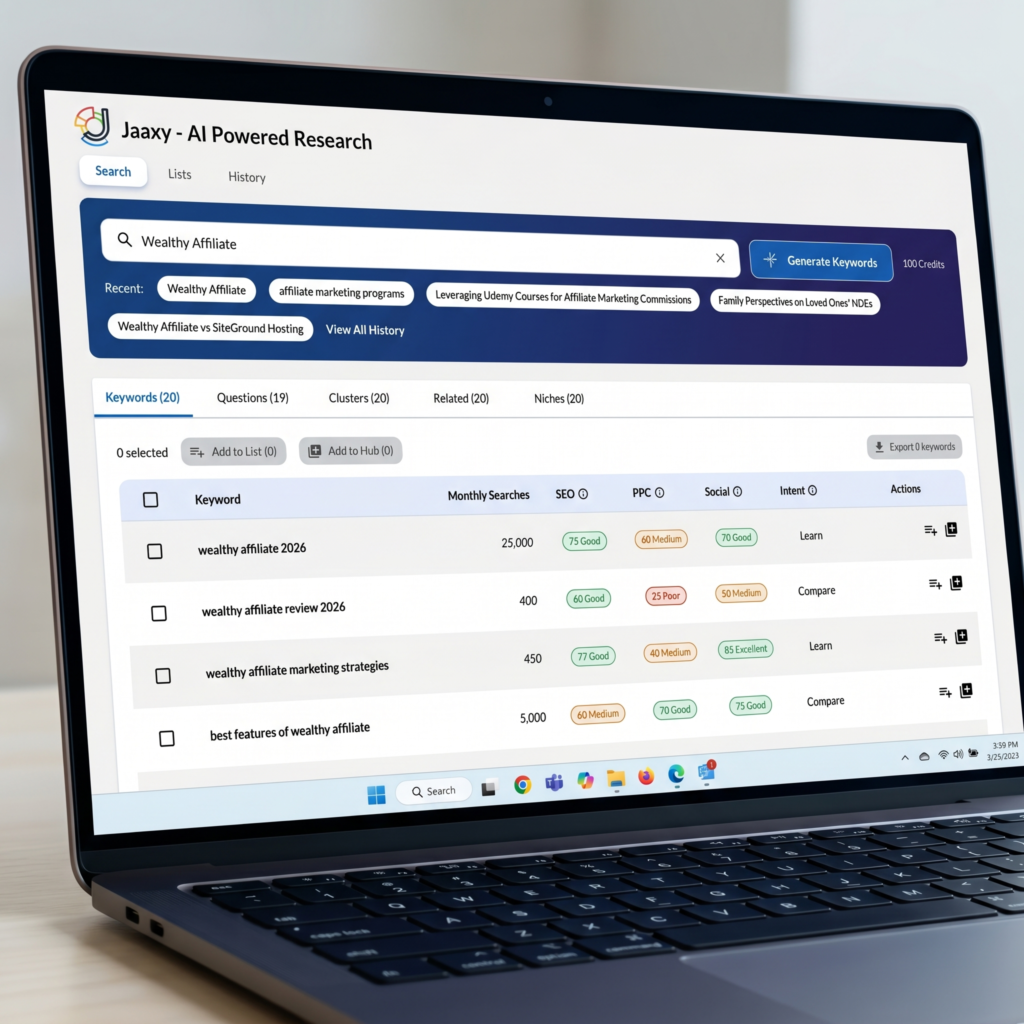
The tool starts with a simple search bar. Pop in any seed keyword, like “healthy recipes” or “budget travel,” and hit enter. You’ll see a list of related keywords, plus valuable info for each one:
- Avg: Average monthly searches for that term.
- Traffic: The number of visits you could get if you ranked at the top of search results.
- QSR: Quoted Search Results, which show how much real competition you’re up against online.
- KQI: Keyword Quality Indicator—a quick traffic light color code for keyword quality.
- SEO: A simple score out of 100. Higher is better for ranking.
A Simple Process: How I Use the Tool Every Day
I usually start my keyword hunt with a main topic, like “affiliate marketing.” Within a moment, the tool gives back dozens of variations: “affiliate marketing for beginners,” “affiliate marketing with social media,” and so on. I look at the QSR and the KQI colors first. Green is my go to; yellow and red are high competition zones, which can be tough if your site is still new.
- Enter Your Seed Keyword: Type in a broad term you want to write about. For example, “vegan breakfast.”
- Scan for Low QSR: Look at the QSR number (anything under 100 is pretty good for beginners).
- Check Search Volume: Make sure people are searching for that term. I usually go for keywords with at least 30-50 monthly searches as a minimum.
- Pick Your Topics: Click ‘Save’ on keywords that look promising. You can go back and sort through them later.
Once you have a handful of solid keywords, you’ve basically mapped out your next bunch of blog posts or website pages. I find this process makes brainstorming way less stressful, since you’re not guessing what people want to read about. If you want to build a content plan, just repeat this process for different seed keywords in your niche until you have a variety of options saved.
Handy Features to Watch For In Keyword Research
Wealthy Affiliate keeps things neat with just a handful of powerful features. Here are a few things I really appreciate about this tool:
- Quick Filters: You can instantly filter keywords by search volume, QSR, or even keyword length. This is super useful for finding longtail keywords, which are usually easier to rank for and tend to bring in more focused readers.
- Keyword Lists: Saving keywords directly in the tool helps organize ideas for future posts or campaigns. If I’m planning a series, I save everything to a list first, then go through and pick the best options later.
- Recent, Real Time Data: Search trends mix it up over time, so the tool uses up to date stats. This helps avoid keywords that might have dropped off or become too competitive.
Another feature that stands out is the clean user interface. It is simple to use, making the research process much smoother and letting you focus on finding solid keyword opportunities instead of fiddling with complicated settings. For those who want to work fast, bulk saving and exporting is a breeze, too.
Common Hurdles and How To Deal With Them
Even with a simple tool, I’ve run into a few snags now and then. Here’s what I usually do to sidestep the common problems that come up with keyword research, especially when using the Wealthy Affiliate program:
- Low Search Volume: Sometimes you’ll find a “perfect” keyword but nobody’s searching for it. Don’t get discouraged, though; tweak your seed keyword by adding details (location, product type, intent), or check related phrases in the list.
- High Competition: If all your ideas have a high QSR number, narrow down more. Think about who’s actually searching; people often type in longer phrases when they want specific info.
- Repeating Results: It’s easy to start seeing lots of similar keywords. I mix things up by using synonyms, or searching for broader or narrower topics depending on how crowded the niche might be.
- Outdated Stats: Trends change quickly online. If a keyword looks hot but no longer brings traffic, check social media trends or Google Trends for more info.
Finding Low Competition Winners
Researching Low competition keywords take a little work, but they’re not impossible to spot. My quick method: focus on keywords with QSR below 100, KQI showing green, and monthly searches of at least 30. These may not all be huge, but they add up fast, especially on new sites with less authority. If you keep an eye out for these hidden gems, you’ll set your site up for steady growth.
Quick Steps to Turn Research Into Content
After picking your keywords, the next step is writing the content. I usually build a list of 5 to 10 keywords that fit my site’s topic, sprinkle them naturally through my article, and use the main one in the title and first paragraph. The tool helps you avoid keyword stuffing, which is a big SEO mistake, since you can see exactly what you’ve already saved or used.
- Write for Readers First: Focus on answering questions or offering help, not just slipping keywords in every sentence.
- Add Internal Links: When possible, link between your posts using related keywords, helping both users and Google crawl your site.
- Tweak Titles & Meta Descriptions: Match your main keyword in your post title and the description that shows up in search results. The Wealthy Affiliate platform also has basic SEO training if you need extra guidance.
With practice, your keyword research habit turns into a pretty satisfying routine. It helps your site get found by real people searching every day, and gives each new post a better shot at being seen in the crowded world of online content. Remember that consistent research pays off over time.
Comparison With Other Tools
I’ve tried both free and paid keyword research tools like Google Keyword Planner, Ubersuggest, and even premium options like Ahrefs and SEMrush. Wealthy Affiliate may not have every advanced option the big guys offer, but it covers what beginners and those in the middle actually need, without the learning curve or high price tag. If you ever need deeper data, you can always export your ideas from Wealthy Affiliate and put them into another tool later.
For someone new to search engine optimization, having everything in one spot, including training and support, is a major plus. I often suggest this tool to friends making their first website or those wanting to get better at content planning without being overwhelmed by technical stuff.
Practical Examples: Keyword Ideas Unpacked
Here are a few ways I’ve used Wealthy Affiliate’s keyword tool to drive my own content:
- Local Food Blog: I aimed for phrases like “best vegan restaurants in Austin” and “cheap brunch spots downtown.” Traffic picked up after targeting phrases with QSR below 60 and around 100 searches a month.
- Side Hustle Website: For niches like “easy crafts to sell,” I found related longtails (“easy crafts to sell on Etsy in 2024”) that had little competition and pretty solid search numbers.
- Travel Blog: Keywords like “affordable travel gear” and “carry on only packing guide” led to posts that continue to bring in search traffic every month.
Another Example: Personal Finance Site
If you’re writing for a personal finance site, you might search for “best budget apps for students” or “how to save money on groceries.” Look for those low QSR, moderate search volume keywords. This approach helped me build articles that quickly found an audience and delivered practical value for my readers.
Frequently Asked Questions About the Wealthy Affiliate Keyword Tool
Can I use this tool without a paid Wealthy Affiliate account?
The tool is included in a Wealthy Affiliate premium Plus plan, but there’s a free starter option for checking it out. Upgrading gets you more searches per day and additional features.
How accurate is the search volume data?
The data is pulled from several sources and is pretty close to what you’ll find in Google’s own keyword planner. For professional campaigns, you might compare data across a second tool just to double check.
How often should I do fresh keyword research?
I check for new keywords about once a month per project, or whenever I notice a topic losing steam. Trends change fast, especially in seasonal or tech driven niches.
Some Final Thoughts
Wealthy Affiliate’s Keyword Tool is great if you’re after a simple and approachable way to do keyword research. It’s built for website owners who want straightforward data and a fast workflow, without a steep learning curve. Getting into a regular keyword research habit helps you pick the right topics, create content that pulls in readers, and grow your site more efficiently than guessing what might work. With practice and the right strategy, decent rankings and steady traffic are well within reach for any beginner or intermediate site owner.